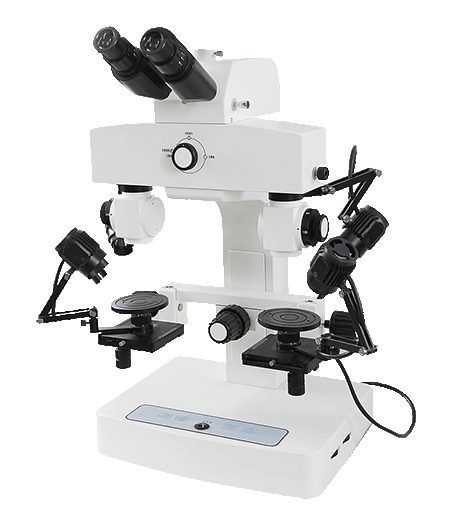
A digital comparison microscope is the right choice when an inspection team must view two specimens in one controlled field, document the result, and return to the same detail later. The best system is selected by the sample, the viewing method, and the amount of movement the workflow requires. OPTOEDU’s A18 range covers step-zoom, LCD, digital, and motorized configurations for document, material, ballistic, and industrial comparison tasks.
What a Comparison Microscope Reveals
A comparison microscope brings two optical paths together so the operator can examine matching or contrasting details without repeatedly moving between separate instruments. Depending on the system, the view can be shown as a full field, a split image, or an overlapping image. That makes small differences easier to judge when the samples have similar patterns, edges, marks, or printed features.
The practical value is not limited to courtroom work. The same viewing principle can support questioned document examination, banknote and security-print inspection, bullet and cartridge comparison, tool-mark review, fiber observation, and selected industrial quality checks. The key question is whether the laboratory needs a reliable visual relationship between two specimens, not simply a higher single-image magnification.
Start with the Specimen and Inspection Task
Paper, Printed Features, and Flat Evidence
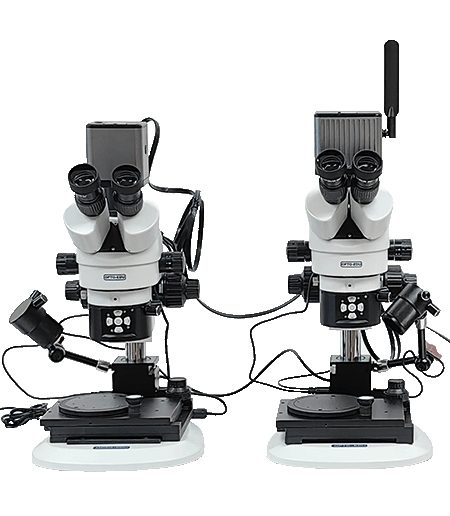
Flat samples often benefit from a stable viewing angle, even illumination, and quick changes between overview and detail. A document examiner may need to compare letter forms, stamp impressions, ink intersections, paper fibers, or security features. In this setting, an LCD comparison microscope can make shared observation easier because several reviewers can follow the same image without taking turns at an eyepiece.
The OPTOEDU A18.1828 LCD Comparison Microscope is suited to workflows that value an integrated LCD view and controlled comparison. Its listed 2–240× range, adjustable binocular viewing head, adjustable separation line, and magnification correction system address the basic problem of keeping two images aligned while the operator changes the viewing scale.
Bullets, Tool Marks, and Irregular Objects
Rounded or uneven specimens create a different challenge. The operator must rotate, reposition, and refocus the samples while preserving the relationship between the two sides. A digital comparison microscope with suitable holders and a flexible working table is more useful here than a system designed only for flat slides.
For a wide observation range, the OPTOEDU A18.1831 Step Zoom Comparison Microscope uses step zoom from 3.2× to 288×. Its listed 5W LED and 12V 50W cold halogen illumination options give the user different ways to reveal surface marks on reflective or textured evidence. The model is a logical fit when the work moves from locating a broad feature to examining a fine mark without changing the whole optical setup.
Compare Viewing and Imaging Workflows
LCD Viewing for Shared Observation
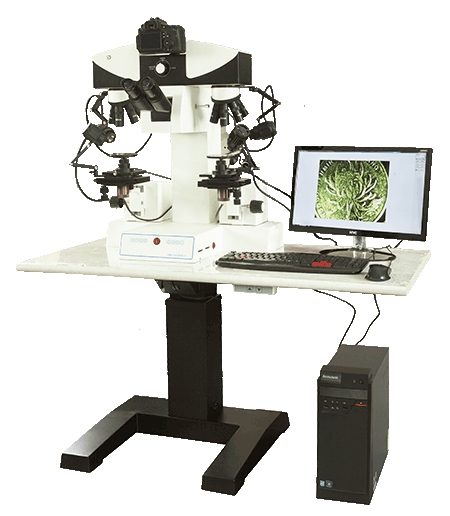
An LCD-based workflow is useful when the result needs to be discussed at the bench, shown during training, or reviewed by more than one person. It also reduces the need for every participant to maintain the same eyepiece position. For teams that prioritize direct visual comparison and simple group observation, the A18.1828-LCD provides a focused path without adding motorized complexity that may not be needed.
Digital Imaging for Review and Documentation
A digital system becomes more valuable when the laboratory must capture, adjust, measure, and compare images. The A18.1830 is described with a motorized working table and software functions for image measurement, color and brightness adjustment, image analysis, and comparison. Those functions connect observation with a record that can be reviewed after the specimen has been removed.
The A18.1829 adds a digital color camera and supports full-field, split, and overlapping display modes. Its working table movement, vertical adjustment, and round-table rotation can be operated manually or electrically. This combination is relevant when a laboratory wants a digital comparison microscope but still needs hands-on control during positioning.
When Motorized Movement Matters
Motorization earns its place when repeated positioning is part of the job. Smooth XYZ movement, vertical adjustment, and controlled rotation can make it easier to return to a feature, align two marks, or work with objects that are difficult to hold still. It can also reduce the amount of coarse manual movement needed at high magnification, where a small adjustment may change the entire view.
The A18.1830 is the clearest option in this group when the working table itself is central to the workflow. The A18.1829 is a useful alternative when the team wants motorized movement together with manual control and a digital color camera. In both cases, the right decision depends on how often samples must be repositioned, rotated, or revisited.
Match OPTOEDU A18 Models to the Workflow
Choose the A18.1831 when a broad step-zoom range and flexible illumination are the main priorities. Choose the A18.1828-LCD when shared LCD observation and straightforward comparison are more important than motorized movement. Choose the A18.1829 when digital color imaging, multiple display modes, and motorized or manual table control need to work together.
Choose the A18.1830 when a motorized digital comparison microscope with a motorized table and analysis functions best matches the laboratory’s documentation needs. Across the range, OPTOEDU gives teams a way to connect optical comparison with the actual rhythm of their work rather than choosing only by maximum magnification.
Conclusion
The best comparison microscope is the one that keeps two specimens aligned, visible, and reviewable throughout the inspection process. Start with the material, then decide whether the workflow needs step zoom, LCD sharing, digital capture, motorized positioning, or a combination of these functions. For laboratories comparing documents, marks, bullets, fibers, or industrial samples, OPTOEDU’s A18 solutions offer a practical range of configurations.
Explore OPTOEDU’s digital comparison microscope solutions for a configuration that fits your inspection workflow.
FAQ
Q: What is a digital comparison microscope used for?
A: A digital comparison microscope is used to view two specimens in one controlled field and capture the comparison for later review. Common tasks include document examination, ballistic comparison, tool-mark observation, security-print inspection, fiber analysis, and selected industrial quality checks where matching small details matters.
Q: How do I choose between LCD and motorized comparison microscope models?
A: Choose an LCD model when shared observation and direct visual comparison are the main needs. Choose a motorized model when the workflow involves repeated XYZ movement, vertical adjustment, rotation, image capture, or software-assisted analysis. The sample shape and frequency of repositioning should guide the decision.
Q: What is the advantage of step zoom in a comparison microscope?
A: Step zoom lets the operator move from a broad view to fine detail through a defined magnification range without rebuilding the optical setup. In the OPTOEDU A18.1831, the listed 3.2×–288× range supports both orientation on a specimen and closer examination of small surface marks.
Q: Can a comparison microscope be used for document and material inspection?
A: Yes. A comparison microscope can support flat document work as well as irregular material inspection, provided the system has suitable illumination, sample positioning, and viewing control. LCD, digital, and motorized configurations can be matched to the need for shared review, image records, or precise specimen movement.